LTO Revision Of Records 2026: How To Update Your Driving License?
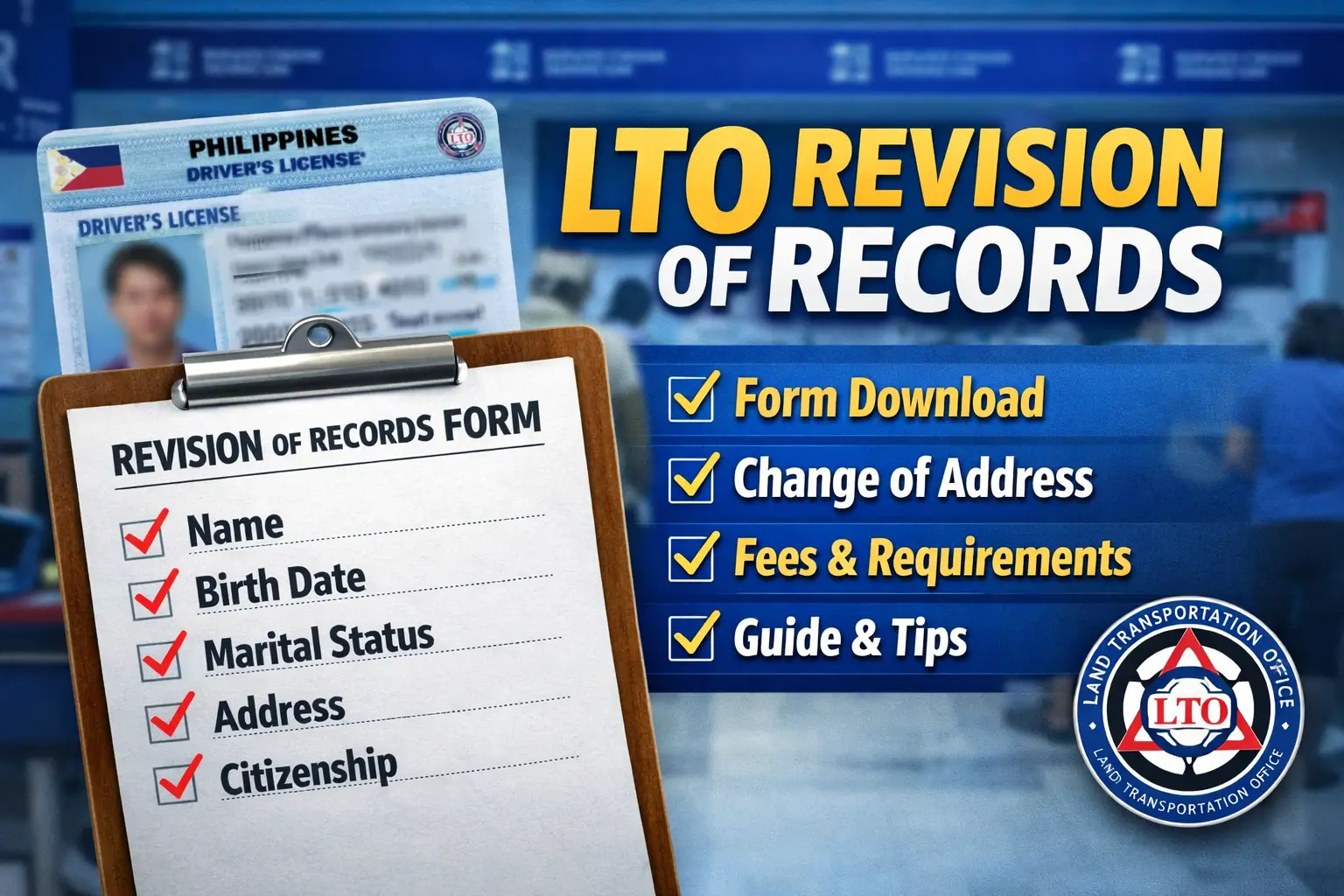
LTO Revision Of Records. When managing your driver’s license or vehicle records, accuracy is very important. Many people visit the Land Transportation Office (LTO) for license renewal or vehicle registration. Now, many services are also available online through the Land Transport Management System (LTMS) portal.
However, sometimes your personal details in the LTO system may not be correct. Maybe your name is misspelled. Maybe your birth date is wrong. Maybe you moved to a new address. In such cases, you must request an LTO Revision of Records.
This detailed guide explains everything you need to know about LTO revision of records, including meaning, form download, address change, fee, requirements, and step-by-step procedures.
What is LTO Revision of Records?
LTO Revision of Records refers to the process of updating or correcting personal information in the records of licensed drivers. This includes changes such as:
- Incorrect or misspelled name
- Incorrect birth date
- Change in last name after marriage
- Change in marital status
- Change in address
- Change in citizenship
Your driver’s license is an official government ID. It must always show correct and updated information. Incorrect records can cause problems during renewals, verification, or legal matters.
Keeping your LTO records updated also helps you receive correct alerts and notifications through the LTMS portal.
Why Updating Your LTO Records is Important
Think about this situation.
You move to a new house. Your old address is still in the LTO system. If LTO sends important documents or notices, they will go to your old address. You may miss important updates or even violation notices.
Incorrect birth year can also create serious problems. It may appear that you intentionally changed your age to qualify for a license. That is why correcting records immediately is very important.
Types of Driver Records You Can Update at the LTO
At the Land Transportation Office, drivers and motor vehicle owners can request different kinds of record corrections. There are six main types of revision transactions available. Each type depends on what information needs to be corrected or updated in your records.
Let’s explain each one clearly.
1. Correction of Incorrect Name (Spelling or Format Error)
This type of request applies when your name is spelled incorrectly or entered in the wrong format in the LTO system. For example:
- Your first name has a spelling mistake.
- Your middle name or surname is arranged incorrectly.
This is considered a simple clerical correction. Because it is only a minor encoding error, you do not need a court order. To request this correction, you usually need to submit:
- Duly accomplished Application for Permits and Licenses (APL) form
- Original and photocopy of your birth certificate issued by the Philippine Statistics Authority (PSA)
- Your current driver’s license and/or motor vehicle Official Receipt (OR) and Certificate of Registration (CR)
Once verified, the LTO can correct the mistake in their records.
2. Correction of Incorrect Birth Date
If your date of birth is recorded incorrectly, you must fix it as soon as possible. This may involve:
- Wrong birth month
- Wrong birth day
- Wrong birth year
Minor mistakes such as incorrect day or month are treated as clerical corrections. However, if the birth year is incorrect, it may raise concerns.
An incorrect birth year can make it appear that the applicant adjusted their age to qualify for a driver’s license. In such situations, the correction may be treated as a judicial matter.
You may be required to submit:
- A notarized affidavit
- A court order approving the correction
Because this can become more complicated and costly, it is always best to correct birth date errors immediately.
3. Change of Name (Usually After Marriage, Divorce, or Annulment)
A change of name request usually involves updating a woman’s last name after marriage. It may also involve removing a married surname after divorce or annulment.
For example:
- A woman adopts her husband’s surname after marriage.
- A divorced applicant wants to return to her maiden name.
This type of update is generally straightforward. Required documents may include:
- Marriage certificate (for newly married applicants)
- Court order (for divorce or annulment cases)
These documents prove the legal basis for the name change.
4. Change in Marital Status
Aside from changing the surname, a driver may also update their marital status in LTO records. This applies when someone:
- Gets married
- Gets divorced
- Gets legally separated
- Becomes widowed
For marriage or widowhood, submitting supporting documents such as a marriage certificate or death certificate is usually enough.
In cases of divorce, separation, or annulment, a court order may be required to confirm the change in marital status.
Keeping this information updated ensures that your official records reflect your true legal status.
5. Change of Address
If you move to a new home after getting your driver’s license, you must update your registered address with the LTO. Even if you return to a previous address, your records must match your current residence.
Although this change is simple, it cannot usually be completed fully online. You must visit an LTO branch in person. To request an address update, you may need to submit:
- Proof of address
- Valid government IDs
- Supporting documents such as a barangay certificate or billing statement
Updating your address ensures that all official communication from the LTO reaches you correctly.
6. Change in Citizenship
Drivers who need to update their citizenship details can also file a revision of records request. This type of change often requires additional supporting documents because citizenship is a sensitive legal matter.
The documents required will depend on your situation and will be reviewed by the LTO during evaluation. For example, if you are correcting your citizenship record, you may need to provide:
- Application for Driver’s License (ADL) form
- Current driver’s license
- Passport
- Immigration card issued by the Bureau of Immigration
Since this request involves legal status, personal appearance at an LTO branch is typically required.
Who Can Apply for LTO Revision of Records?
Any driver’s license holder who wants to update personal records can apply. However:
- You must not have pending LTO cases.
- You must submit complete documents.
LTO Revision of Records Form Download
Many applicants ask about the LTO revision of records form download.
The forms commonly used are:
- Application for Driver’s License (ADL) Form
- Application for Permits and Licenses (APL) Form
You can download these forms from the official LTO website or get them directly from an LTO branch.
If applying online through LTMS, you will fill out digital forms instead.
General Requirements for Online LTO Revision of Records
Before submitting your request online, make sure you prepare the basic documents required by the LTO. These include:

- Valid or expired driver’s license
- Duly accomplished Application for Driver’s License (ADL) form
- Original PSA Birth Certificate with photocopy
- Valid government-issued ID with photo and signature
These are the standard documents required for most revision requests. However, depending on the type of correction, you may need to submit additional documents.
Additional Requirements Based on Type of Record Change
Each type of revision has specific document requirements. Below is a clear explanation of what you may need to prepare.
1. Incorrect Name (Spelling Error or Clerical Mistake)
If your name is misspelled or incorrectly recorded in the LTO system, you will need:
- PSA Authenticated Birth Certificate with official receipt
- Affidavit of Discrepancy
If the applicant is Muslim, additional documents may be required:
- Affidavit from at least two disinterested persons
- Certification from the Office of Muslim Affairs (OMA)
These documents help confirm the correct spelling and identity.
2. Incorrect Birth Date
If your birth month, day, or year is wrong in the system, you must submit:
- Affidavit of Discrepancy
For Muslim applicants:
- Affidavit from at least two disinterested individuals
- Certification from OMA
This ensures that the correction is supported by legal documentation.
3. Change in Name (Marriage, Divorce, Annulment)
If your last name changed due to marriage, divorce, or annulment, you need to provide proof of legal name change.
Required documents may include:
- Proof of change in marital status
- Photocopy of Marriage Contract
- Court Order (for annulment or divorce cases)
- Updated passport reflecting the name change
For Muslim applicants:
- Affidavit from two disinterested persons
- Certification from OMA
These documents verify that the name change is legal and valid.
4. Change in Marital Status
If your marital status changed due to marriage, divorce, annulment, or widowhood, you must submit supporting documents. Documents may include:
- Proof of marital status change
- Marriage Contract photocopy
- Court Order (for divorce or annulment)
- Updated passport if applicable
For Muslim applicants:
- Affidavit from at least two disinterested individuals
- Certification from OMA
This ensures that your LTO records reflect your correct legal status.
5. Change of Address
If you moved to a new residence, you must update your address in LTO records. Required documents:
- Current or expired driver’s license
- Barangay Certificate
- Proof of current billing (electricity, water, internet, etc.)
This confirms your new residential address.
6. Change in Citizenship
If there has been a change in your citizenship, you must provide documents proving your updated status. These may include:
- Passport showing new citizenship
- Alien Certificate of Registration
- Foreign driver’s license (if applicable)
The LTO will evaluate your documents before approving the request.
LTO Revision of Records Fee
The standard fee is:
- ₱30.00 per record
This fee applies regardless of the number of fields revised. Payment is made at the LTO cashier.
How to Apply for LTO Record Change (In Person)
Here is the complete process:
- Step 1: Prepare all required documents based on your type of revision.
- Step 2: Visit your preferred LTO branch.
- Step 3: Submit documents for evaluation.
- Step 4: The evaluator checks authenticity and completeness.
- Step 5: Photo and signature may be captured.
- Step 6: Pay ₱30 fee at the cashier.
- Step 7: Wait for release of updated driver’s license.
Processing time may take up to 30 days depending on the branch.
How to LTO Revision of Records Via LTMS Portal
If you want to update your personal details online, you can use the LTMS Portal. The process is simple if you follow the correct steps. Below is a clear and unique step-by-step guide to help you complete your LTO revision of records smoothly.
Step 1: Prepare Your Device and Internet
Before starting, make sure:
- Your internet connection is stable.
- You are using an updated web browser like Chrome or Edge.
- You have digital copies of your required documents ready for upload.
This will help you avoid errors during submission.
Step 2: Visit the Official LTMS Portal
Open your browser and search for “LTMS LTO” or directly go to the official LTMS website. Once the homepage opens, click the Log In button.
If you do not yet have an account, click Register and follow the instructions to create your LTMS account first.

Step 3: Log In to Your Account
Enter your:
- Registered email address or LTO Client ID
- Password
After entering the correct details, click Sign In. Make sure your login details are correct to avoid account lock issues.

Step 4: Open the Licensing Section
After logging in, you will see your dashboard. Look for the Licensing icon in the menu and click it. This section handles all license-related transactions.

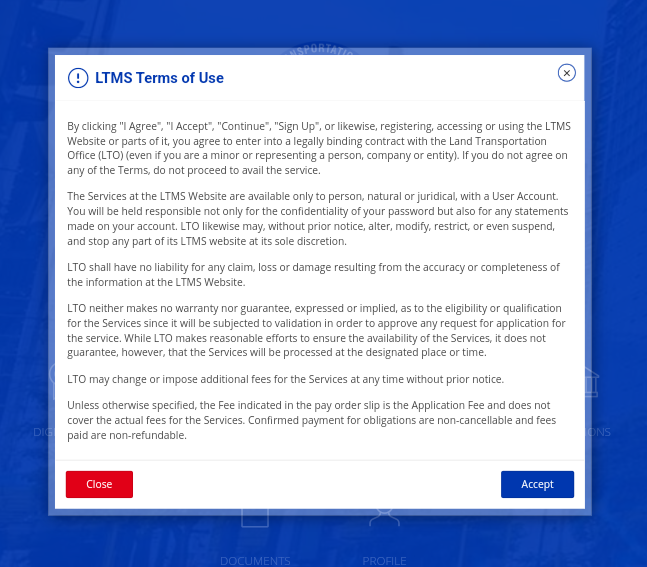
Step 5: Accept the Terms of Use
Before proceeding, you must read and accept the Terms of Use. Click the agreement option to continue.
Step 6: Select Your License Type
Inside the Licensing section, you will see options like:
- Student Permit
- Driver’s License
- Conductor’s License
Choose the type of license you currently hold and click Next.

Step 7: Choose “Revision of Records”
You will now see a list of available transactions. Select Revision of Records from the list.
This option allows you to update or correct your personal details.

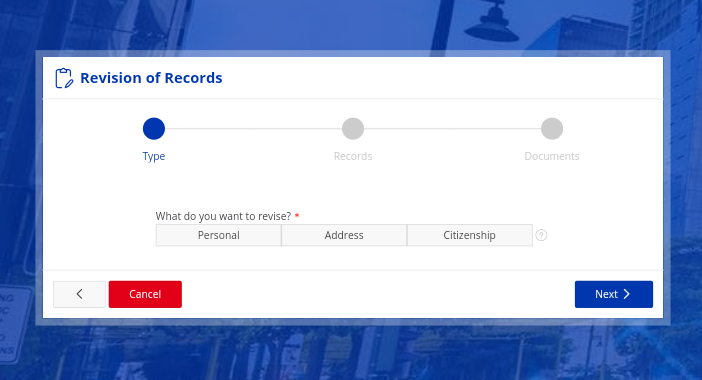
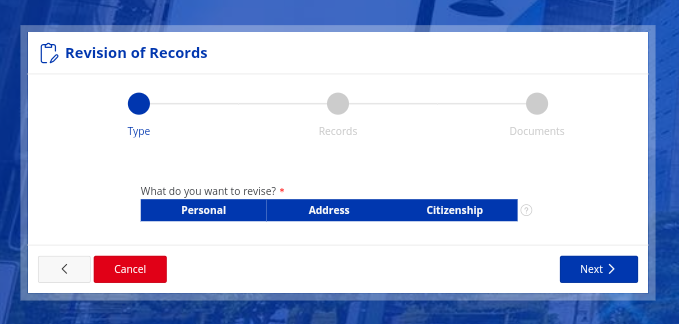
Step 8: Select the Category to Revise
Under the Revision of Records menu, you will find different categories such as:
- Personal Information
- Address
- Citizenship
Choose one or more categories depending on what information you want to update. After selecting, click Next.

Step 9: Enter Updated Information
Now, fill in the correct details in the required fields.
Make sure:
- Spellings are correct
- Dates are accurate
- All information matches your official documents
After entering the new information, upload the required supporting documents.
Step 10: Review All Details Carefully
Before submitting, carefully review:
- Name spelling
- Birth date
- Address details
- License number

Even a small mistake can delay your application. Once you are sure everything is correct, proceed to submit.
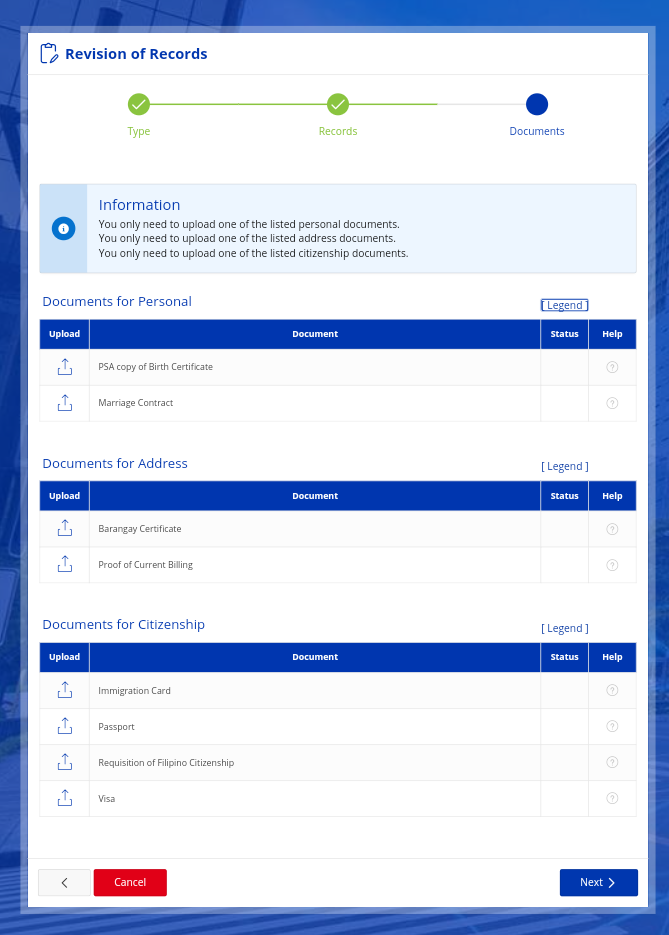
Step 11: Upload Required Documents Properly
For each selected category, upload at least one required document.
After uploading, click Save.
Important: Check the document status to confirm that the upload was successful. If the status shows incomplete or failed, upload again.
Step 12: Enter License Details
You will be asked to enter:
- Your license or student permit number
- Expiry date
Enter the correct information and click Next. Follow the remaining instructions shown on the screen.
Step 13: Wait for Confirmation and Updates
After submitting your request:
- Monitor your LTMS account
- Check your SMS notifications
LTO will inform you about the status of your application.
Step 14: Complete Biometric Process (If Required)
In some cases, you may need to visit an LTO branch for:
- Biometric capture
- Photo update
- Signature verification
Follow the instructions provided in your portal notification.

Step 15: Claim Your Updated License
Once your request is approved and processed, collect your updated permit or driver’s license from the designated LTO branch.
Make sure to bring your valid ID when claiming.
Video Guide
Important Reminders
Before applying for LTO revision of records, keep these points in mind:
- Renew your driver’s license before it expires to avoid higher fees. If it stays expired for more than two years, it becomes dormant.
- Make sure you have no pending LTO cases or violations. Clear them first, or your request may not be approved.
- The process may take up to 30 days, depending on the case.
- Some revisions can be done online through the LTMS portal, while others require visiting an LTO branch.
- Different types of changes require different documents, and some may need personal appearance.
Always prepare your documents carefully to avoid delays.

FAQs About LTO Revision of Records
What is LTO revision of records?
Ans: LTO revision of records means correcting or updating your personal information in your driver’s license record. This may include your name, birth date, address, marital status, or citizenship.
How much is the LTO revision of records fee?
Ans: The standard fee is ₱30.00 per record. This fee applies even if you change more than one detail.
Can I update my LTO records online?
Ans: Yes, some revisions can be done through the LTMS portal. However, certain changes may still require personal appearance at an LTO branch.
Where can I download the LTO revision of records form?
Ans: You can download the Application for Driver’s License (ADL) form or Application for Permits and Licenses (APL) form from the official LTO website. You can also get the form directly from any LTO branch.
How long does the revision of records process take?
Ans: Processing may take up to 30 days. The exact timeline depends on the type of correction and document verification.
Can I request revision if my license is expired?
Ans: Yes, you can. But it is better to renew your license before it expires to avoid additional penalties. If your license has been expired for more than two years, it becomes dormant.
Do I need to visit the LTO branch for change of address?
Ans: In most cases, yes. Change of address usually requires personal appearance and submission of proof of residence.
What happens if I do not update incorrect information?
Ans: Incorrect information may cause delays during renewal, verification issues, or legal complications. It is always safer to correct errors immediately.
Conclusion
Keeping your LTO records accurate is your responsibility as a licensed driver. Whether you changed your address, updated your name after marriage, corrected your birth date, or changed citizenship, you must ensure your driver’s license reflects correct information.