How To Renew Your Driver License Via the eGovPH App In The Philippines (LTO Online Renewal Guide)

How To Renew Your Driver License via the eGovPH App. In today’s fast-paced world, the ability to renew your driver’s license via the eGovPH app is a huge convenience for motorists across the Philippines. No longer do you have to spend hours lining up at the Land Transportation Office (LTO). With a smartphone and a stable internet connection, the process can be completed right from your home or office.
This detailed guide will walk you through the entire process, from downloading the app to receiving your renewed driver’s license. We’ll also address the essential requirements such as the Online Driving Enhancement Program (ODEP) certificate, the medical certificate, and include helpful tips to avoid delays.
What is the eGovPH App?
The eGovPH app is an official mobile application launched by the Philippine government to simplify access to various government services. Available for free on both the Apple App Store and Google Play, this app allows citizens to transact with different agencies without physically visiting their offices.
Among its many features, one of the most popular is the ability to renew your driver’s license via the eGovPH app, making life much easier for millions of drivers.
Read also: How To Renewal of Philippine Driver License for OFWs Abroad
Requirements
The following items are required before you can begin your online application:
- Certificate from the Online Driving Enhancement Program (ODEP)
- The 5-hour Driver’s Enhancement Program (DEP) can be completed via the LTO’s online database (https://www.odep.ph/).
- Proof of completion can be uploaded within the app.
- Medical Examination Certificate for Telemedicine
- Attend an online medical exam through the telemedicine portal (https://dcitelemed.ph/).
- Virtually undergo basic vision and hearing tests.
- A physical copy of the driver’s license (front and back)
- In order to renew your membership, you must upload a clear image or scan.
- The digital photo and signature have been updated
- Captured while the application is running inside the app, according to the format specified.
A Guide to Renew Your Driver’s License via the eGovPH App
Here’s a step-by-step guide to renew your driver’s license using the eGovPH app. The app is free to download through the Apple App Store and Google Play for Android users.
- Install the eGovPH app and tap ” Government Agency “. button.
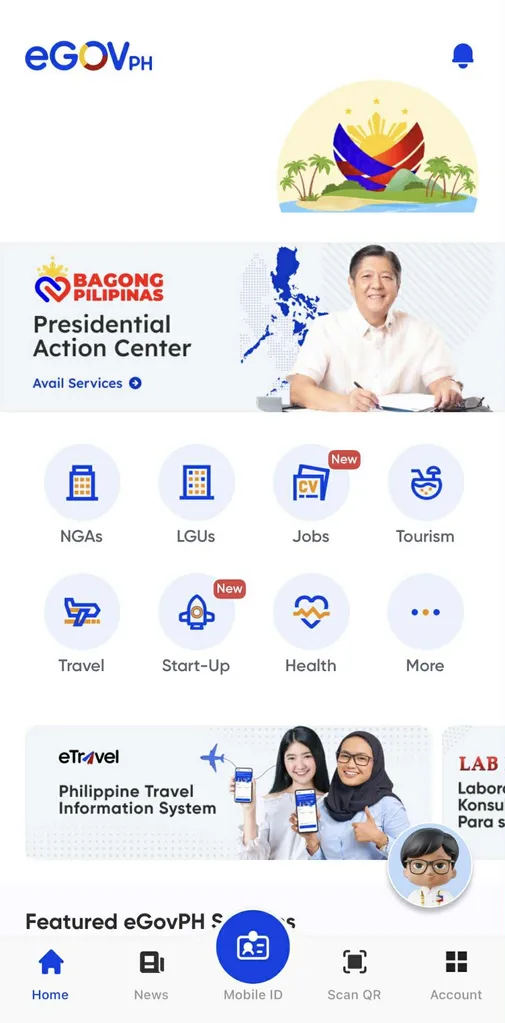
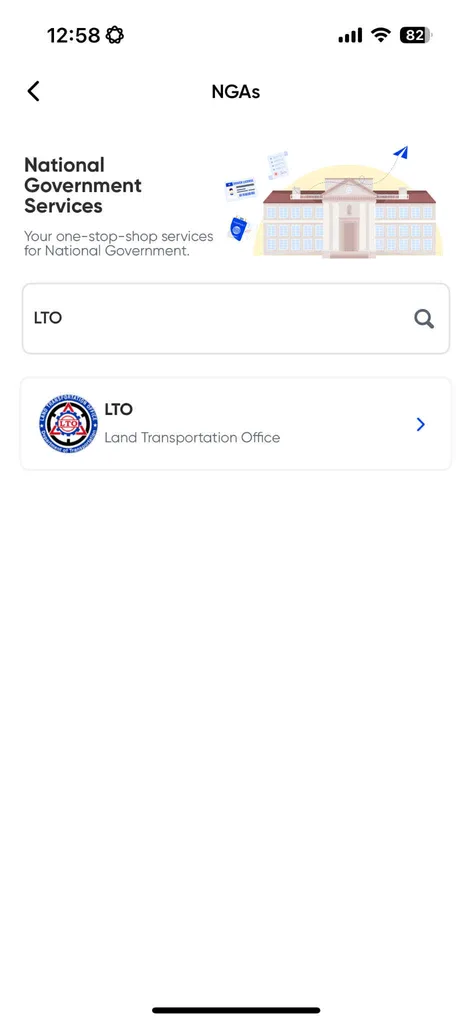
- Choose “LTO” from the list of government agencies. The search bar can also be used for easier access.
- From the list of four options, choose “Online Driver’s Application” and click “Complete your profile.”
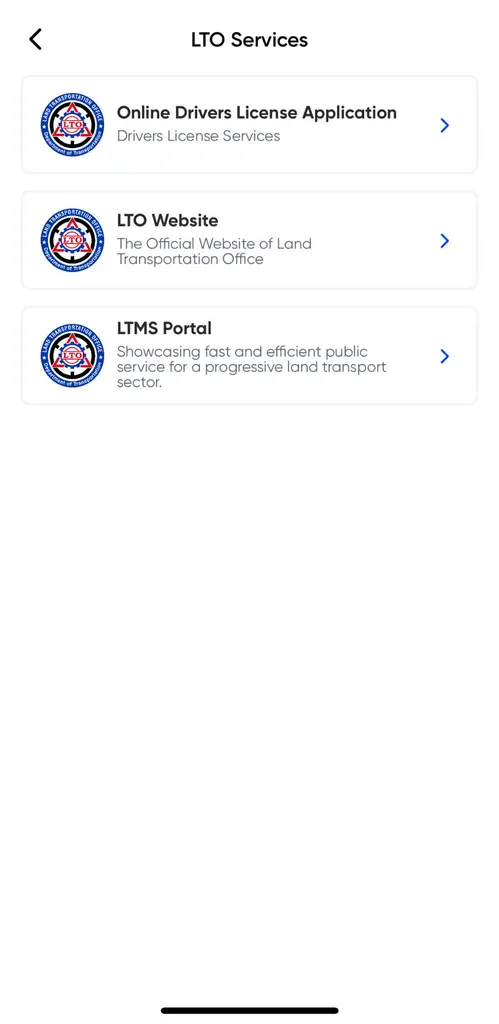
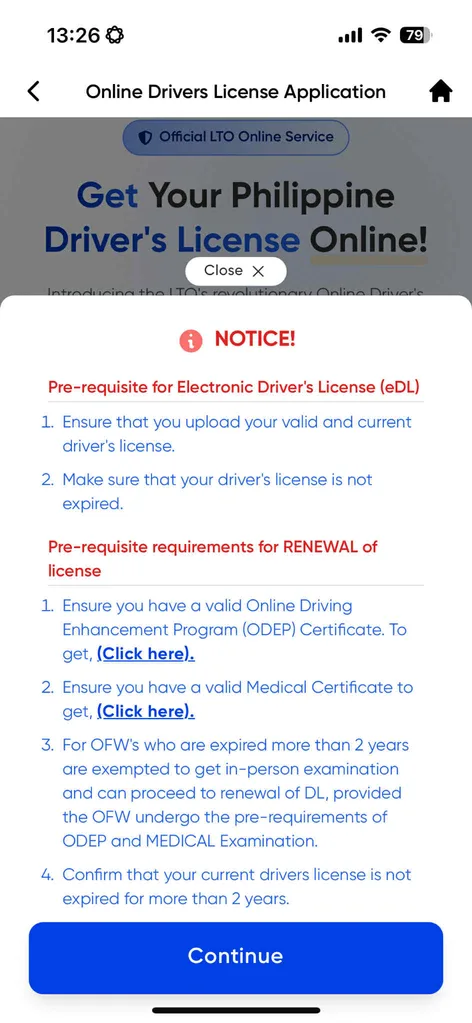
- For the renewal of your license, you will be shown a notice of the pre-requisite requirements. It includes a certificate from the Online Driving Enhancement Program (ODEP) and a medical certificate.
- You can obtain an ODEP certificate by clicking the link in the pop-up. After registering, taking a selfie, inputting your payment details, and going through the online modules, you will be asked to take a test. About five hours are estimated to be needed to complete the materials.
- If you have completed and answered the quizzes pertaining to all the materials, you will receive an ODEP certificate.
- You will need to schedule an appointment online in order to obtain a medical certificate. During the assessment, motorists will undergo vision and hearing tests. Upon the completion of your medical examination, the doctor will provide you with the medical certificate needed for the renewal of your license.
- If you have both the ODEP and medical certificates, you may tap the “Continue” button on the pop-up.
- Please upload a clear photo of your driver’s license. Your information will be extracted from the photos by the system.
- Fill in any missing or inaccurate information regarding your personal information.
- You will need to upload your photo and digital signature in order to update your driver’s license.
- When you are satisfied that all the information is accurate, click “Submit.”
- Once you have submitted all your requirements, the eGovPH app will let you know if you have met them. You can apply for a driver’s license or renew it by tapping “Renewal.”

- The image is from the Department of Transportation
- You will receive a text message from the LTO when your transaction has been successful once you have paid the applicable fee.
- Once your renewal application is approved, the LTO will send you another text message. If you choose to have your license delivered to your home, you’ll have the choice of picking it up at the nearest LTO location or picking it up at the nearest LTO office.
What Happens After You Submit?
- The renewal of your driver’s license is processed digitally.
- In the eGovPH app, you can now get an electronic driver’s license (eDL). The card is valid and recognized like a physical license.
- Depending on your preference, the physical license can be delivered or picked up.
Who Can Renew Online Using eGovPH?
You can use the eGovPH app if you already possess a valid or expired Filipino driving license. It is possible, however, that those who have expired licenses for more than two years or who still owe penalties may be required to renew their licenses manually through an LTO office.
Where to Apply
Through the App Store or Google Play Store, you can download the eGovPH app and apply for a driver’s license renewal using your smartphone. To renew your driver’s license, simply tap the NGA icon, select the LTO, choose Online Driver’s Application, then click Renew Your Driver’s License. In this manner, you should be able to complete the entire process within the app, from uploading your requirements to meeting pre-requirements, making payments, as well as accessing both electronic and physical license delivery options.
Cost and Processing Timeline
Renewal of a license through the eGovPH app follows the same fee structure as the LTMS portal: a standard on-time license renewal costs around ₱685 (₱100 application + ₱585 license fee), with the added penalty (₱75–₱225) and a small computer processing charge if your license is expired. The online application typically takes about 30 minutes once all the requirements are in place. A physical version of your license will be delivered to you by pickup or courier usually delivered within 72 hours, while your electronic version appears instantly in the app.

Why Use the eGovPH App for Driver’s License Renewal?
Here are some undeniable benefits:
| Benefit | Details |
|---|---|
| Saves Time | Avoid long queues at the LTO office. |
| More Convenient | Complete most requirements from home. |
| Transparent Process | Real-time updates via SMS and the app. |
| Paperless Transactions | Upload documents directly in the app. |
| Secure and Official | Backed by the Philippine government. |
Benefits
You can renew your driving license via the eGovPH app and enjoy the following benefits:
- A convenient, app-based method for renewing a driver’s license using a smartphone
- LTO offices will no longer require in-person visits or queueing
- There is a reduced risk of dealing with fixers or unauthorized agents
- Processing time is faster and status updates are provided in real-time via SMS and in-app notifications
- An electronic driver’s license (eDL) can be accessed through this app
- Multiple payment gateway options are integrated into the system
- Delivery of the physical driver’s license card to your home is optional
- The same app can be used to access other government services beyond LTO
- Filipinos living abroad or in remote areas can benefit from a simplified renewal process
- Transparency and efficiency in the public sector are promoted by the national digitization program
FAQs About Renew Your Driver’s License Via the eGovPH App
How long does it take to renew your driver’s license via the eGovPH app?
Ans: The online process itself can take just a day if you already have the required documents. However, completing the ODEP modules may take around 5 hours, and obtaining a medical certificate can vary depending on clinic schedules.
Can I still renew my driver’s license at the LTO office instead of using the app?
Ans: Yes, traditional over-the-counter renewal is still available. However, using the eGovPH app is highly recommended for its speed and convenience.
What happens if I fail the ODEP test?
Ans: You’ll be allowed to review the modules and retake the test. Passing the ODEP ensures that drivers have up-to-date knowledge of road rules, which promotes safer driving for everyone.
Conclusion
The option to renew your driver’s license via the eGovPH app is a game changer for Filipino motorists. By making the process largely digital, it reduces congestion at LTO offices and makes compliance with driver regulations simpler than ever.