LTO Plate Tracker App 2026: A Complete Guide to Track Your Vehicle Plate Number Delivery And Verify Driver License Status
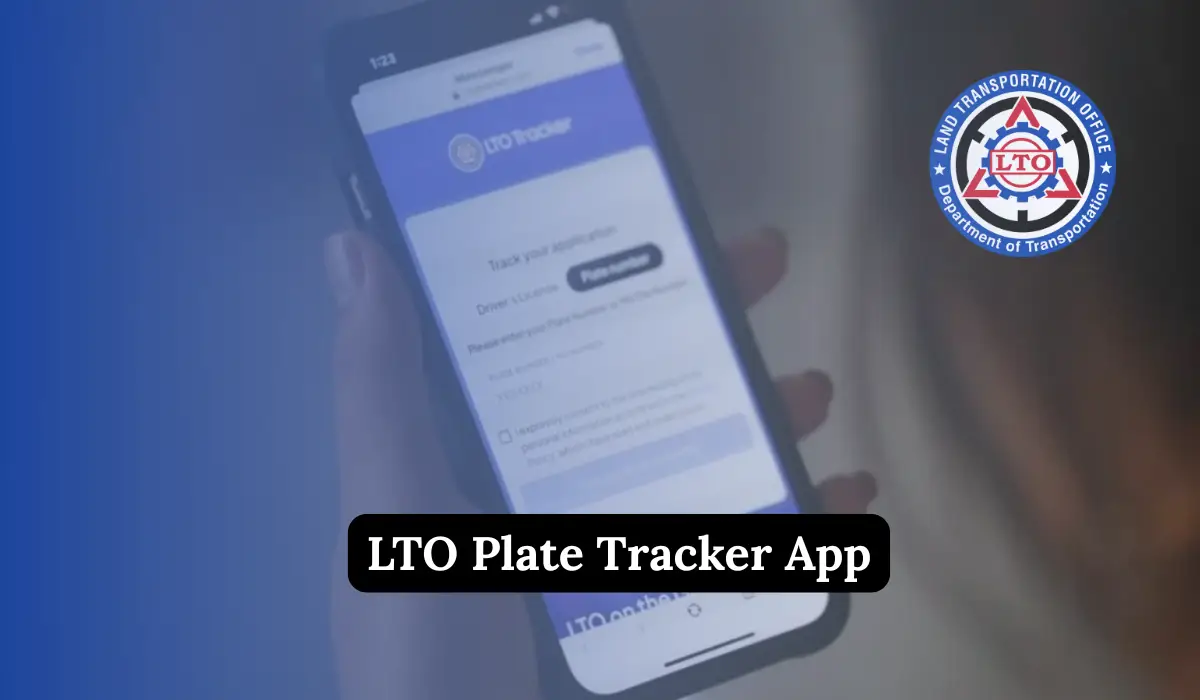
LTO Plate Tracker App. Managing your driver’s license and vehicle plate in the Philippines has never been easier thanks to the LTO Plate Tracker App. This free online tool from the Land Transportation Office (LTO) allows motorists to check the status of their license or plate anytime, anywhere. No more long queues, repeated visits, or guessing about the status of your documents.
In this article, we’ll discuss everything you need to know about the LTO Tracker, including plate number delivery, plate verification, steps to track your documents, home delivery process, fees, tips, and more.
What is the LTO Plate Tracker App?
The LTO Tracker is a web-based tool designed to help vehicle owners and drivers check the status of their driver’s license or vehicle plates. By using this tool, you can:
- See if your driver’s license is ready for pickup.
- Check the production status of your vehicle plate.
- Choose whether to pick up your documents at an LTO branch or have them delivered to your home.
All you need is your driver’s license number or 15-digit Motor Vehicle (MV) file number from your Certificate of Registration (CR), along with a stable internet connection.
This service saves you time, energy, and even money by minimizing unnecessary trips to the LTO office.
Requirements for Using LTO Tracker
For Driver’s License Tracking:
- Driver’s license number
- Birthdate
- LTMS client number (if your record is not found)
For License Plate Tracking:
- Plate number or 15-digit MV file number from your CR
- Additional details if not found: name, birthdate, OR/CR info, email, phone number, and LTO transaction location
For Delivery Requests:
- Clear photo of government-issued ID
- Copy of OR and CR for the vehicle
- Complete delivery address
- Payment for courier fee via GCash or QRPh
How to Use the LTO Tracker
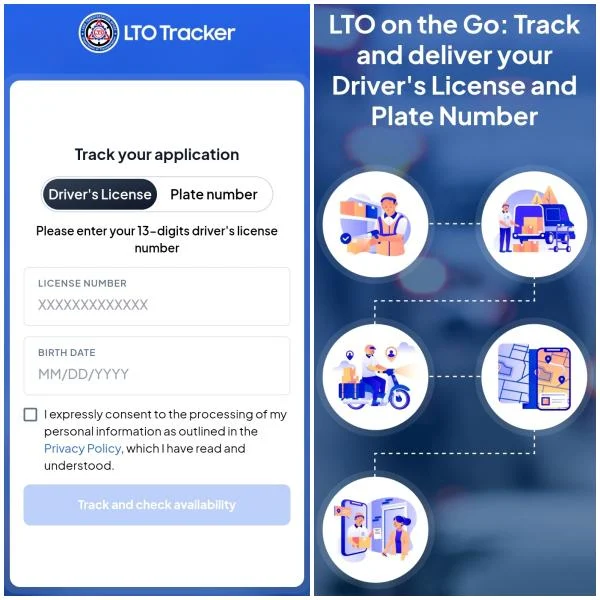
Here’s a step-by-step guide:
- Visit the official website: https://ltotracker.com
- Choose the service: Driver’s License or License Plate
- Enter your details:
- License: Enter your license number and birthdate
- Plates: Enter plate number or 15-digit MV file number
- Check the status: Possible results include In Process, Dispatched, Ready for Pick-Up, or Available for Delivery
- Select pick-up or delivery: Upload ID and OR/CR for delivery, and pay the fee
- Track delivery progress: Follow the courier until your license or plate arrives
Tracking Your Vehicle Plate
Tracking your vehicle plate is simple. Follow these steps:
- Open the “License Plate” section on the LTO Tracker website.
- Choose your tracking method:
- Enter your plate number
- Or enter the 15-digit MV file number from your Certificate of Registration.
- Click “Track” to view the status. The possible status updates include:
- In Process
- Dispatched
- Available for Pickup
- Ready for Delivery
Pick Up or Delivery Options
Once you know your plate or license status, you have two options:
1. Pick Up
- Visit the LTO branch indicated in your status.
- Bring your valid ID and registration papers.
2. Home Delivery
- Upload clear photos of your government-issued ID and OR/CR.
- Fill in your complete delivery address.
- Pay the courier fee via GCash or QRPh.
- Track your delivery using the SMS tracking number provided. Delivery usually takes 3–10 business days.
Home Delivery Process Step-by-Step
Step 1: Upload Clear Documents
Make sure your ID and OR/CR photos are sharp and legible. Blurry photos can delay the process.
Step 2: Fill in Your Address
Provide full details: house number, street, barangay, city/municipality, landmarks, and a contact number.
Step 3: Pay the Fee
Delivery fees range between ₱150–₱600, depending on your location. You can pay using GCash or QRPh.
Step 4: Track Your Delivery
Once your payment is confirmed, you will receive an SMS with a courier tracking number. You can track your package until it arrives.
Key Benefits of Using LTO Tracker
Using the LTO Plate Tracker App comes with multiple benefits:
- Time Savings: Track your documents online in minutes instead of spending hours at the LTO.
- Cost Savings: Delivery fees are lower than making multiple trips.
- Convenience: Check the status on any device, day or night.
- Transparency: Clear, step-by-step updates on your document’s progress.
- Security: Digital uploads and payments minimize risks of fraud.
Fees for LTO Tracker Services
Delivery fees vary depending on location:
- Metro Manila: around ₱150–₱200
- Outside Metro Manila: ₱200–₱600
Payments can be made through GCash or QRPh. Users report fees like:
- ₱158.49 for plate delivery within Quezon City
- ₱240 for shipping license to Cebu City
- ₱159 for delivery via GogoExpress
LTO Tracker Plate Number Delivery
The LTO Tracker plate number delivery ensures you receive your vehicle plates directly at home. This eliminates long travel and waiting time at LTO branches. The process is simple:
- Enter plate number or MV file number
- Choose delivery option
- Upload ID and OR/CR
- Pay the courier fee
- Track delivery using SMS tracking
Home delivery usually takes 3–10 business days, depending on your location.
LTO Tracker Plate Number Verified
The LTO Tracker plate number verified feature ensures that your plate number is genuine and matches LTO records. By verifying your plate:

- Avoid purchasing fake plates
- Confirm your plate is ready for delivery or pick-up
- Track the current status of your plate production
Verification is fast and accurate when using the official LTO Tracker App.
Who Can Use the LTO Tracker?
The LTO Tracker is designed for:
- Motorists waiting for their driver’s license or vehicle plate.
- Vehicle owners who recently purchased a new car or motorcycle.
- Those who renewed their driver’s license.
- Owners requesting replacement plates or licenses due to loss, damage, or updates.
- People who prefer home delivery over in-person pick-up.
- Anyone with internet access wanting to track updates online.
Note: Foreign driver’s license conversions are handled only via the Philippine Postal Service, not through the LTO Tracker.
Why Use LTO Tracker?
Here are the main benefits of using the LTO Tracker App:
1. Skip the Lines
No more waiting for hours in crowded LTO offices. You can track your license or plate online within minutes.
2. Stay Informed
Get real-time updates on your driver’s license or plate status. Know exactly when your documents are processed, dispatched, or ready for delivery.
3. Home Delivery
If you don’t want to visit an LTO branch, you can have your license or plate delivered straight to your doorstep for a small courier fee.
4. 24/7 Access
Check your status anytime—even during weekends or holidays.
5. Security and Transparency
By uploading clear photos of your documents and paying online, the process is safe, reducing fraud risks.
Common Issues and How to Solve Them
1. Document Not Found
- Double-check the numbers entered
- Use alternative identifiers like OR/CR or LTMS client number
2. Blurry Photos
- Upload clear, recent, and legible photos
3. Delay in Delivery
- Keep your courier tracking number handy
- Contact LTO support if the package does not arrive within 10 business days
4. Payment Issues
- Save the receipt or screenshot of your payment
- Ensure you use accepted payment methods: GCash or QRPh
Real User Experiences
Many users have shared positive experiences with the LTO Tracker App:
- One user received their vehicle plate in 3 days with a delivery fee of ₱158 in Quezon City.
- Another user in Cebu City paid ₱240 and received their driver’s license safely at home.
- Metro Manila users reported delivery fees below ₱200, making home delivery cheaper than repeated LTO trips.
These experiences confirm that the LTO Tracker App is reliable, convenient, and quick.
Tips For Smooth Tracking
To avoid delays or mistakes, follow these tips:
- Double-check the numbers and dates you enter.
- Use clear, recent photos of your documents.
- Save your payment receipt.
- Keep your courier tracking number handy.
FAQs About LTO Plate Tracker App
Is the LTO Tracker free to use?

Yes, checking the status of your license or plate is free. Only home delivery incurs a fee.
How long does home delivery take?
Delivery usually takes 3–10 business days, depending on your location.
Can I verify a plate number using LTO Tracker?
Yes, the app allows you to verify your plate number and confirm its authenticity.
What payment methods are accepted for delivery?
You can pay via GCash or QRPh depending on your location.
Conclusion
The LTO Plate Tracker App has revolutionized how motorists in the Philippines manage their driver’s licenses and vehicle plates. It is fast, safe, convenient, and reliable. With home delivery, real-time updates, and verified plate numbers, motorists can save time, money, and energy.