LTMS Portal Account Recovery 2026: How to Quickly Recover Forgotten LTO Login And Reset Your Password
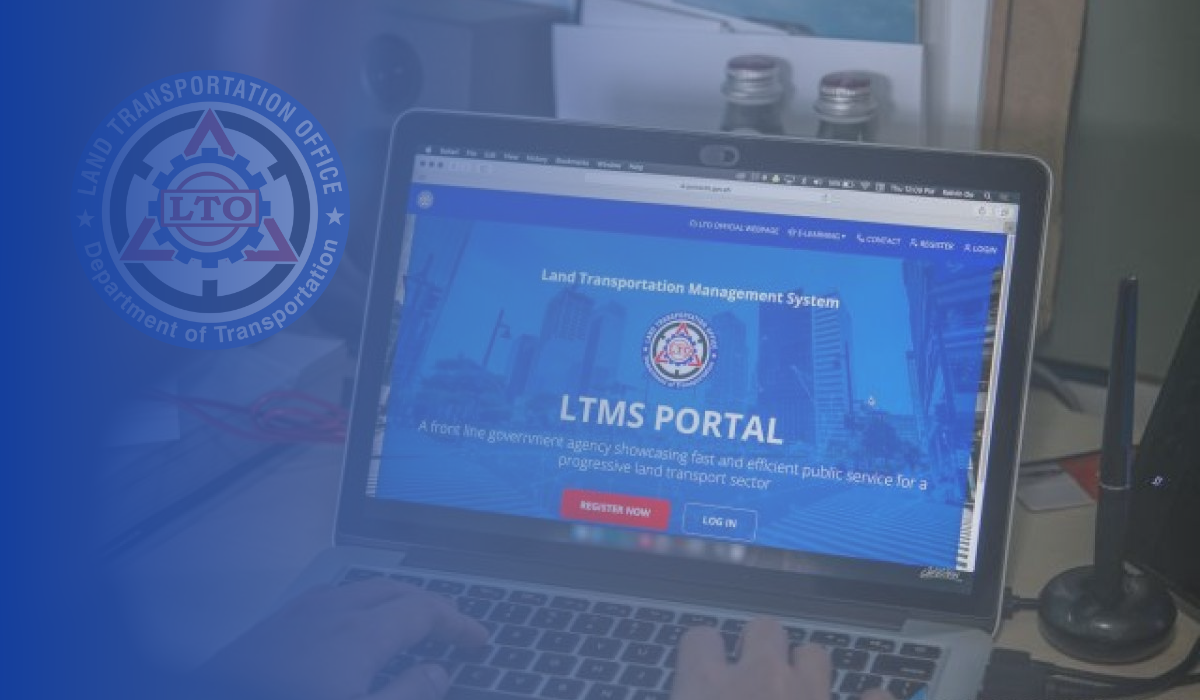
LTMS Portal Account Recovery. If you have lost or forgotten your account for the Land Transportation Management System (LTMS) portal, you must restore it so that you can continue to receive vital driver’s license-related services and information. It allows users to manage their accounts effectively and stay informed about any relevant updates or transactions from the Land Transportation Office (LTO).
When you are unable to determine whether you already have a LTMS portal account, there is an option to retrieve it. This is also true if you do not remember your registered email address or password, as well as if you have lost access to your registered email and cannot remember your nominated password. Following these steps will allow you to regain access to your account very quickly and easily if that should occur.
What is LTMS and Why is Access Important?
The Land Transportation Management System (LTMS) is an online portal operated by the Land Transportation Office (LTO) in the Philippines. This platform serves as a hub for various motor vehicle-related services, such as driver’s license renewals, vehicle registration, and other LTO transactions. For anyone in the Philippines who owns a vehicle or holds a driver’s license, accessing LTMS is an essential task for handling transportation services quickly and efficiently.
Having a reliable and secure login to the LTMS portal is crucial for users to manage these services. Losing access to this portal due to a forgotten password can cause unnecessary delays in processing documents and transactions. Fortunately, if you find yourself locked out of your account, the recovery process is easy and can be completed in just a few steps.
Recover Your LTMS Account
LTMS portal account loss or forgetfulness involves being unable to access your account for various reasons, such as forgetting login credentials, misplacing registration information, changing personal information and losing access to the old ones, experiencing problems during the registration process, or being locked out of your account due to security measures. You may experience frustration and inconvenience when this happens, as it stops you from being able to manage your important driver’s license-related information, and you also cannot access the digital services provided by the portal provided by the LTMS.
So, you will need to recover your LTMS portal account if you have forgotten your login details, are experiencing registration issues, have been locked out of your account, or have security concerns. If you wish to retrieve or recover your account, then you must verify your identity and provide the necessary documentation in order to regain access to the LTMS portal and its features.
Who Can Retrieve/Recover My LTMS Portal Account?
Before you can retrieve or recover your LTMS portal account, you must first open an account with the LTMS portal. It is imperative that you are an LTMS portal account owner or someone who has been authorized to participate in the recovery process, such as LTO Client Care or personnel at LTO offices, before you can begin the recovery process to ensure security and legitimacy.
Requirements
If you wish to recover your LTMS portal account, one of the first steps that you need to take is to gather the required documentation:
- A valid email address associated with your LTMS account
- A valid government-issued photo ID with a signature
- This letter of consent explicitly authorizes LTO Client Care to change or retrieve the account information for the LTMS portal.
Note: The name and signature of the account owner should be included in the letter.

- A photo of the individual holding a valid government-issued photo identification card
- Information about Contacts
Procedures
If you wish to receive a seamless recovery process of your LTMS portal account, please follow the following prescribed steps.
Lost or Forgotten LTMS Password?
If you have forgotten your LTMS portal password, then you should head to the website of the LTMS portal and follow these steps to retrieve it:
Step 1. Go to the LTMS Portal website

If you have forgotten your password, you can change it or retrieve your account by navigating to the official LTMS portal website.
Step 2. Choose the “Forgot Password” link.

Upon clicking the “Login” button, you will then be given the option to select “Forgot Password.”

Step 3. Please provide your Registered Email Address or LTO Client ID.
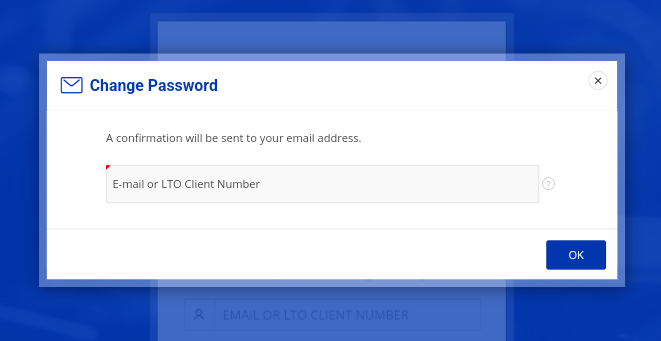
To proceed with the process, enter either your registered email address or LTMS Client Number and click “OK”.
Step 4. Please wait for instructions
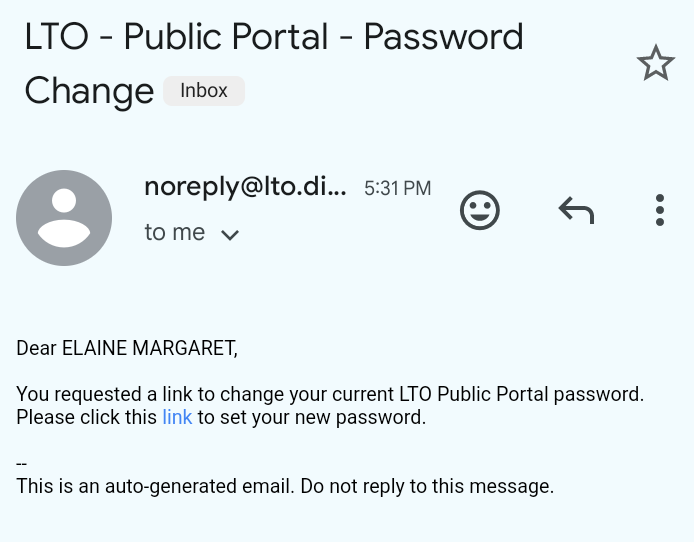
When you submit your registered email address or LTMS Client ID, wait patiently for the system to send an email containing instructions and a link to reset your password.
Step 5. Make sure you change your password
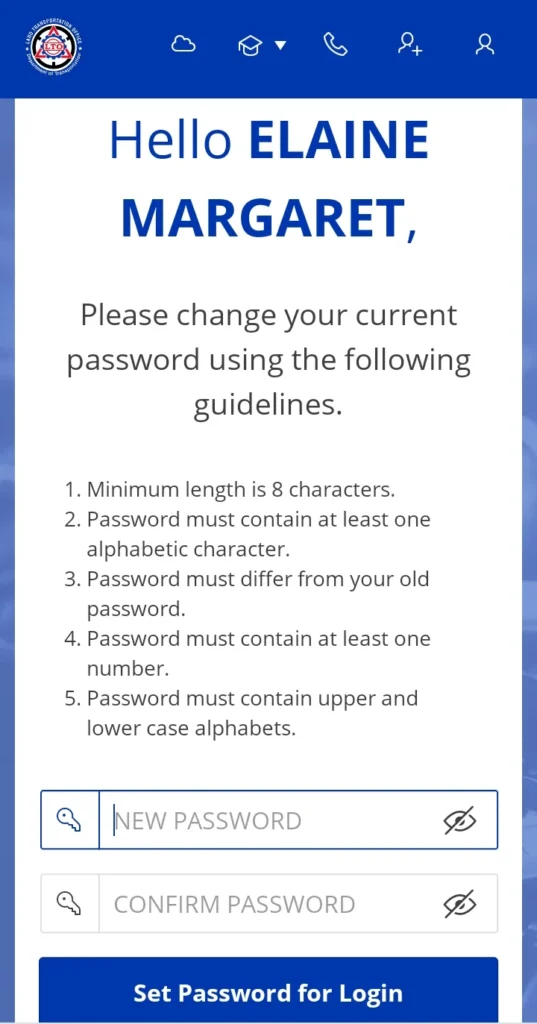
Upon clicking the link provided in your email to reset your password, you will be redirected to the LTMS portal where you can complete the process. Make sure that you follow the password guidelines provided by the website, enter your new password twice, and then click “Set Password for Login.”
Step 6. The confirmation
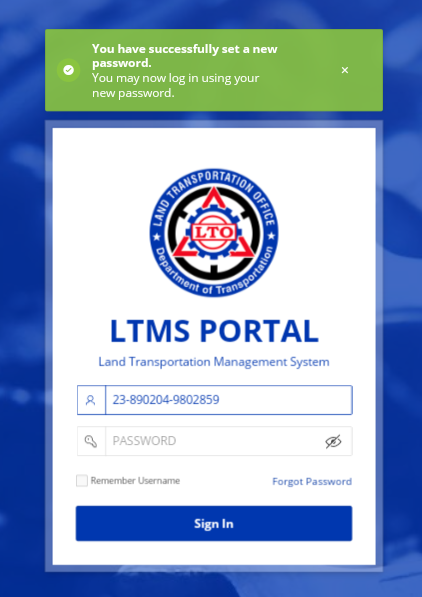
When the process has been successfully completed, a confirmation will be displayed indicating that the password has been changed.
Step 7. Try logging into your LTMS Portal account again.
You are now able to log in with your new password and access the LTMS portal for all LTO related transactions once you receive the confirmation that the password change has been successful.
Lost or Forgotten LTMS Password – Video Guide
Verification Email Issues
Your LTMS account may be having a problem if you have not received a verification email after creating an LTMS Portal account. Here is how to resolve this:
- Step 1. You must wait for at least twenty-four (24) hours to receive the confirmation email in order to complete the process.
- Step 2. The email confirmation will be sent to your inbox within twenty-four (24) hours, if you have not received it by then please check your spam folder.
- Step 3. Make sure that you complete the verification process within 24 hours if you are able to locate the email.
- Step 4. You should contact LTO Client Care if you still have not received the email and the issue persists. The Contact tab in the LTMS portal provides access to LTO Client Care.
Lost or Forgotten Registration Details/Email Address/LTO Client ID
The first thing to try if you encounter the message “The driver’s license you have entered has been registered,” when you try to register for an LTMS account is to recall the email address used during registration. Please follow these steps if you are unable to register for an LTMS portal account or you do not believe you have previously registered for an LTMS portal account:
Step 1. The process should be initiated
Log into your active email account and start the account recovery process by email.
Step 2. Compose Your Email Request
Write a clear and concise email to the “LTO Client Care” at [email protected] expressing your intention to change or retrieve the password for your account on LTMS.
Step 3. Prepare and Attach the Required Documents
Please attach the documentation you have prepared in advance and click on the Send button.
Alternative Solution: Create a New LTMS Portal Account
If you wish to, you may also create a New LTMS Portal account again if you wish to do so. Simply follow the instructions listed in this guide on How to Register for an LTMS Portal Account to complete this process.
Alternative Solution: Visit the Nearest LTO Office
Alternatively, you may visit an LTO branch office in person in order to verify the registration and obtain your LTO client number. When you visit the nearest branch of the Land Transportation Office (LTO), you will be able to expedite the process of solving your registration issue, as LTO personnel possess the authority to assist you in creating or regaining your account for the LTMS, as long as you can verify your identity. Furthermore, they can assist you with finding or retrieving your LTO client number, registering for a new LTMS portal account or processing any other transaction you may require. If you are able to provide them with all the required documentation, they may also address any other lingering issues.
Additional Tips to Secure Your LTMS Account
While it’s easy to reset your password, it’s essential to take precautions to secure your LTMS account and prevent future password issues. Here are a few tips to help you maintain your account’s security:
- Use a Password Manager: A password manager can securely store all your passwords, making it easier to remember them.
- Enable Two-Factor Authentication: Whenever possible, enable two-factor authentication (2FA) for extra protection.
- Update Your Password Regularly: Consider changing your password every few months to keep your account secure.
- Avoid Using Weak Passwords: Avoid common passwords such as “123456” or “password.” These are easy to guess.
Common Issues with LTMS Password Recovery
While the password recovery process is relatively straightforward, there can be a few issues that users encounter. Below are some common problems and solutions:
- Email Address Not Recognized: If the email address you entered is not recognized, double-check to ensure that you are using the correct email address. If you registered with a different email, try entering that one.
- Password Reset Link Expired: Password reset links typically expire after a certain period. If you try to use an expired link, you may need to initiate the recovery process again.
- Forgotten LTO Client ID: If you cannot remember your LTO Client ID, try looking for it in any past emails from the LTMS portal, or check any receipts or documents you’ve received from the LTO. If you still can’t find it, you may need to contact LTMS customer support for further assistance.
FAQs About Recovering Your LTMS Password
What if I can’t remember my registered email address or LTO Client ID?
Ans: If you’re unable to recall your registered email or LTO Client ID, you can recover it by contacting LTO Client Care through email or by visiting an LTO branch in person. You will need to provide the required documents to verify your identity.
What should I do if the password reset link expires?
Ans: If the password reset link expires, you will need to initiate the process again. Simply return to the LTMS portal, click “Forgot Password,” and follow the steps to receive a new reset link.
How do I recover my LTMS account if I didn’t receive the verification email?
Ans: If you don’t receive the verification email within 24 hours, check your spam or junk folder. If it’s not there, contact LTO Client Care for further assistance in completing the verification process.
Can I create a new LTMS account if I lost my previous login credentials?
Ans: Yes, if you cannot recover your login details, you can create a new LTMS portal account by following the registration instructions on the portal. If you’re unsure, LTO personnel can assist you at a local branch.
How can I make my LTMS account more secure?
Ans: To enhance security, use a password manager to store passwords securely, enable two-factor authentication (2FA), regularly update your password, and avoid weak passwords.
Conclusion
Recovering a lost or forgotten LTMS password is a straightforward process that can be completed by following a few simple steps. It’s essential for maintaining access to the vital services provided by the Land Transportation Office (LTO). If you ever find yourself locked out, don’t worry by following the recovery instructions, you can quickly regain access. Make sure to secure your account with strong passwords and regularly update them to avoid future issues. With these steps, you can continue to manage your LTO transactions with ease and confidence.